Utilities

Sometimes there is a need to have valuable command line  utilities. All utilities
listed here run in the command shell of Windows NT. The correct nomenclature is
character-mode applications (applications that do not provide their own graphical user
interface).
utilities. All utilities
listed here run in the command shell of Windows NT. The correct nomenclature is
character-mode applications (applications that do not provide their own graphical user
interface).
THIS SOFTWARE AND DOCUMENTATION IS PROVIDED "AS IS," AND COPYRIGHT HOLDERS MAKE NO REPRESENTATIONS OR WARRANTIES, EXPRESS OR IMPLIED, INCLUDING BUT NOT LIMITED TO, WARRANTIES OF MERCHANTABILITY OR FITNESS FOR ANY PARTICULAR PURPOSE OR THAT THE USE OF THE SOFTWARE OR DOCUMENTATION WILL NOT INFRINGE ANY THIRD PARTY PATENTS, COPYRIGHTS, TRADEMARKS OR OTHER RIGHTS. COPYRIGHT HOLDERS WILL NOT BE LIABLE FOR ANY DIRECT, INDIRECT, SPECIAL OR CONSEQUENTIAL DAMAGES ARISING OUT OF ANY USE OF THE SOFTWARE OR DOCUMENTATION.
- Monitor: Always remember the good old VMS system monitor
- IANSI: A utility that can interpret some common ANSI terminal escape sequences
- Pong: TCP connection test
Monitor
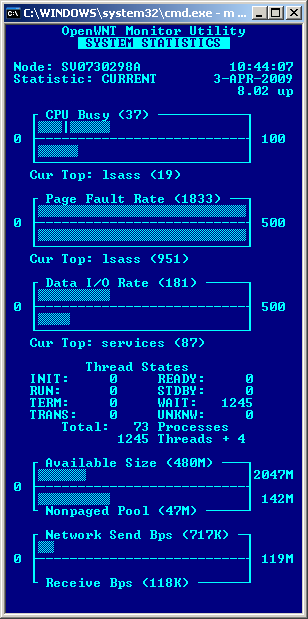
This Utility is based on the OpenVMS Monitor Utility (bar graph style format). It uses the Windows Performance Monitor API registry interface for retrieving performance data. You can do local and remote monitoring. Please note that the collection of remote performance objects like processes and threads generate large transfer volumes. The machine where this program runs is called the host machine. The machine from where the performance data are retrieved is called the target machine. To receive monitoring data it is required to have administrative rights on the target computer.
The following OS Versions should be possible:
|
There is an x86, an AMD64 and an IA64 version of this program. It's a great pity not to have an ALPHA version, but there is no ALPHA cross compiler. This cpu architecture restriction affects only the host machines. As target machines all architectures (x86, ALPHA, MIPS, PPC, AMD64 and IA64) should work but my test environment is very limited in this point. All possible combinations hit the terrifying number of 414 (23 targets * 18 hosts) without any Service Pack, Language and Marketing variations. The returned performance data format and organization is OS Version dependent which makes this challenge even more difficulty. So it's possible that this program may break with current or future OS Versions. This problem always exists, but in this case it's probably higher.
Note: KB128746 - Under Windows NT 3.X and 4.0, the object "Network Interface" is added to Performance Monitor when you install Microsoft Simple Network Management Protocol (SNMP).
IANSI
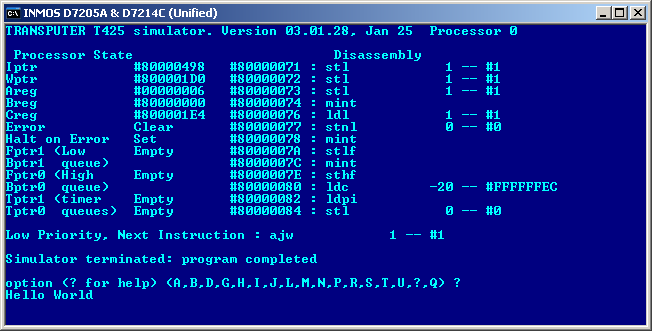
Some utilities which utilize ansi.sys under DOS get useless after porting to WindowsNT. This
hits me in particularly with isim and idebug from the INMOS transputer development suite.
To overcome this limitation this utility formats the data received from standard input and writes the output to the console output.
Only APIs from Windows NT 3.1 are used. As long as Microsoft doesn't make serious changes all OS Versions derived from Windows NT should also be possible. This includes Windows 7 and the server branch.
There is an x86, an AMD64 and an IA64 version of this program. As I have no IA64 test environment, this utility may not even start on your Itanium box.
Pong
Not yet published ...
 Back to the top